About FLOW Mix
The new FLOW Mix app for iPadOS tablets and iOS mobile phones offers wireless remote control for the Behringer FLOW 8 Digital Mixer. This app is using Bluetooth BLE to connect to the hardware. The FLOW Mix app offers...
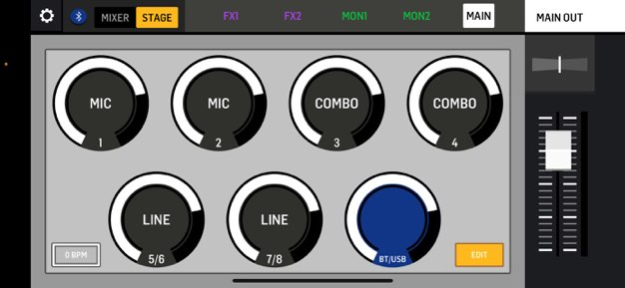
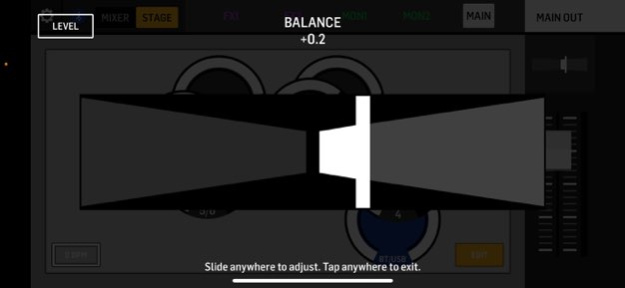
The new FLOW Mix app for iPadOS tablets and iOS mobile phones offers wireless remote control for the Behringer FLOW 8 Digital Mixer. This app is using Bluetooth BLE to connect to the hardware. The FLOW Mix app offers musicians, producers or engineers control of all mixer parameters. This includes levels, panning, eq, compression and effects as well as snapshot memory. The user interface is designed for comfortable operation on tablets as well as small-format smartphones, with intuitive operation guiding even inexperienced users to a world of great sound with their FLOW mixer. KEY FEATURES . Full remote control including: - Preamp Gain, 48V on MIC 1/2 - Main-Mix Level, Pan, Mute, Solo - All Input Channels with Low-Cut Filter, 4-band EQ and Compressor - Bus-Sends to FX and MON-Out - Main and Monitor Buses with 9-band EQ and Limiters . Customize channels with Icon and Name . Use Assisted Setup to have a quick start as a beginner . Load and store Mixer-Snapshots in the App or on the Hardware . Balance your mix from the Mixer- or Stage-View . Activate or Hide certain inputs to focus on the channels you need . Change routing according to your workflow
Version History Bug fixes and performance improvements 1.14 Mar 22 Bug Fixes and Performance Improvements 1.13 Jan 29 • Updated Snapshot sharing 1.12 10/08/2025 Bug Fixes. 1.11 07/08/2025 Minor UI fixes 1.10 01/06/2024 Bug fixes -Peq freq reset fixed -Mon2 faders restored from Snapshot 1.9 01/04/2024 • Fixed EQ frequencies for input presets • Preferences screen loading issues resolved 1.8 08/01/2023 We're improving the Flow Mix application experience. Kindly update with the latest version for the best experience. REQUIREMENTS: * App 1.7 requires FLOW Firmware V11749 or higher 1.7 07/22/2022 • Fixed an issue to start a new session REQUIREMENTS: * App 1.6 requires FLOW Firmware V11749 or higher 1.6 01/23/2022 • New pre-fader routing option for Monitor 1/2 bus send • New preference for indicating Mute buttons on mixer page • New channel icons displayed in mixer and stage view • Tap Tempo can now be adjusted on all layers in Stage View • New preference for operating controls with a rotary gesture and performance of linear gesture improved • Preferences and Routing pages can now be scrolled on small devices • Fix for Mute/Un-Mute display issues in Stage View • Fix for missing dB reading tooltips • UI glitches in configuration page fixed 1.5 12/29/2021 V1.3 Major Update to support new functionality introduced with Firmware V11739 • New routing options: - USB STREAMING/RECORDING mode - Route USB to channels or Monitor 1/2 outputs - FX to Monitor buses - Headphones routing - Monitor 1/2 stereo link • New Preferences: - Output delay indicator - MIDI SysEx-Dump of the current mixer state - 10dBV output level - Preference for parametric EQ editing • New snapshot scope to specify what will be loaded 1.3 02/16/2021 Fixed an issue in the snapshot library 1.2 12/07/2020 1.0 11/12/2020
Previous Versions
Here you can find the changelog of FLOW Mix since it was posted on our website on 2022-07-27 02:07:44.
The latest version is 1.14 and it was updated on 2026-10-07 02:51:57. See below the changes in each version.
FLOW Mix version 1.14
Updated At: 2026-10-07
Changes: Version History Bug fixes and performance improvements 1.14 Mar 22 Bug Fixes and Performance Improvements 1.13 Jan 29 • Updated Snapshot sharing 1.12 10/08/2025 Bug Fixes. 1.11 07/08/2025 Minor UI fixes 1.10 01/06/2024 Bug fixes
-Peq freq reset fixed
-Mon2 faders restored from Snapshot 1.9 01/04/2024 • Fixed EQ frequencies for input presets
• Preferences screen loading issues resolved 1.8 08/01/2023 We're improving the Flow Mix application experience.
Kindly update with the latest version for the best experience.
REQUIREMENTS:
* App 1.7 requires FLOW Firmware V11749 or higher 1.7 07/22/2022 • Fixed an issue to start a new session
REQUIREMENTS:
* App 1.6 requires FLOW Firmware V11749 or higher 1.6 01/23/2022 • New pre-fader routing option for Monitor 1/2 bus send
• New preference for indicating Mute buttons on mixer page
• New channel icons displayed in mixer and stage view
• Tap Tempo can now be adjusted on all layers in Stage View
• New preference for operating controls with a rotary gesture and performance of linear gesture improved
• Preferences and Routing pages can now be scrolled on small devices
• Fix for Mute/Un-Mute display issues in Stage View
• Fix for missing dB reading tooltips
• UI glitches in configuration page fixed 1.5 12/29/2021 V1.3 Major Update to support new functionality introduced with Firmware V11739
• New routing options:
- USB STREAMING/RECORDING mode
- Route USB to channels or Monitor 1/2 outputs
- FX to Monitor buses
- Headphones routing
- Monitor 1/2 stereo link
• New Preferences:
- Output delay indicator
- MIDI SysEx-Dump of the current mixer state
- 10dBV output level
- Preference for parametric EQ editing
• New snapshot scope to specify what will be loaded 1.3 02/16/2021 Fixed an issue in the snapshot library 1.2 12/07/2020 1.0 11/12/2020
FLOW Mix version 1.13
Updated At: 2026-01-29
Changes: Bug Fixes and Performance Improvements
FLOW Mix version 1.11
Updated At: 2025-07-08
Changes: Jul 8, 2025
Version 1.11
Bug Fixes.
FLOW Mix version 1.10
Updated At: 2024-01-06
Changes: Jan 6, 2024
Version 1.10
Minor UI fixes
FLOW Mix version 1.9
Updated At: 2024-01-04
Changes: Jan 4, 2024
Version 1.9
Bug fixes
-Peq freq reset fixed
-Mon2 faders restored from Snapshot
FLOW Mix version 1.8
Updated At: 2023-08-01
Changes: Aug 1, 2023
Version 1.8
• Fixed EQ frequencies for input presets
• Preferences screen loading issues resolved
FLOW Mix version 1.7
Updated At: 2022-07-22
Changes: Jul 22, 2022 Version 1.7
We're improving the Flow Mix application experience.
Kindly update with the latest version for the best experience.
REQUIREMENTS:
* App 1.7 requires FLOW Firmware V11749 or higher
Disclaimer
Official App Store Link
We do not host FLOW Mix on our servers. We did not scan it for viruses, adware, spyware or other type of malware. This app is hosted by Apple and passed their terms and conditions to be listed there. We recommend caution when installing it.
The App Store link for FLOW Mix is provided to you by apps112.com without any warranties, representations or guarantees of any kind, so access it at your own risk.
If you have questions regarding this particular app contact the publisher directly. For questions about the functionalities of apps112.com contact us.